Kajabi vs Teachable: Which Course Platform Fits a Coaching or Wellness Practice?

Kajabi and Teachable are the two names that come up first when a coach or practitioner decides to sell an online course. They both help you create and sell courses, and they are priced very differently. Most of that difference is about caps: what each plan lets you have before the next plan is required, and whether a slice of each sale goes to the platform.
Everything below comes from the two companies' own plan and feature pages, checked on the dates listed at the end. We sell a competing product, so we've kept to what each site says and left the judgement to you, apart from the last section, where we say plainly what neither does.
If you only want the short version: Teachable is the cheaper seat for a first course to a small audience, Kajabi is the bigger toolbox when your email list is the business, and neither one keeps the books or fills a retreat.
Kajabi vs Teachable at a glance
Both are hosted online course platforms, and each is an online course platform first and a business tool second. You upload lessons, set a price, and the platform delivers the course, takes the payment and manages the students. Both also sell coaching, memberships and digital downloads as product types.
What Kajabi is
Kajabi is an all-in-one platform by its own description. Its features page lists online courses, coaching, communities, memberships and podcasts, plus a website builder, landing pages, funnels, email marketing and automation. The idea is that a creator runs the whole knowledge business inside Kajabi, and the price reflects that. Kajabi also gives every plan a full email marketing tool, which is unusual for a course platform.
What Teachable is
Teachable is built as a course platform first. Its plans page lists courses, coaching products, digital downloads, memberships, iOS and Android student apps and global tax handling, with built-in email and a simple site builder around them. Teachable doesn't position itself as the whole business, and it costs less because of it. Teachable also lets you keep your existing website and email tool and plug the school into them.
That framing is not ours alone. David Hartshorne, who tested both platforms on their mid-tier plans for Zapier, opened his review with it:
They both enable you to create and sell online courses, but Kajabi positions itself as an all-in-one platform for building your online business.
David Hartshorne, writer and owner of Azahar Media, Zapier
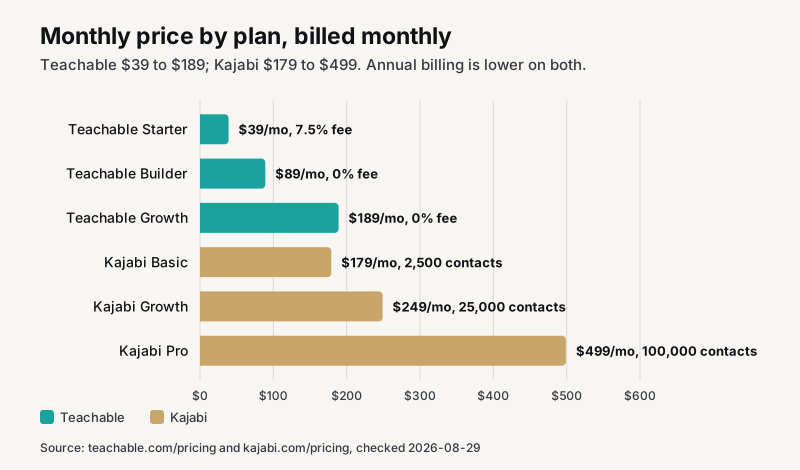
Teachable vs Kajabi pricing, as printed
Prices below are the monthly rates when billed monthly. Both companies discount annual billing, so we list that figure too. Every pricing plan on both sites is month to month with no contract.
Kajabi pricing
Kajabi publishes three plans on kajabi.com/pricing:
- Basic at $179 a month, or $143 a month billed annually: 5 products, 2,500 contacts, 1 website, 1 community, 2 admin users.
- Growth at $249 a month, or $199 annually: 50 products, 25,000 contacts, 1 website, 1 community, 11 admin users.
- Pro at $499 a month, or $399 annually: unlimited products, 100,000 contacts, 3 websites, 3 communities, 26 admin users.
Kajabi charges no transaction fee on any plan. The page says "No hidden fees. No revenue sharing." Card processing through Kajabi Payments is listed at 2.9%, 2.8% and 2.7% plus 30 cents by plan. There is a 30-day free trial.
Teachable pricing
Teachable publishes three plans and a custom tier on teachable.com/pricing:
- Starter at $39 a month, or $29 a month billed annually: 5 products, 100 active students, 1 admin user, and a 7.5% transaction fee on every sale.
- Builder at $89 a month, or $69 annually: 10 products, 1,000 active students, 1 admin user, no transaction fee.
- Growth at $189 a month, or $139 annually: 50 products, 5,000 active students, 5 admin users, no transaction fee, custom domain.
- Custom by contact with sales.
Teachable charges card processing on its own gateway at 2.9% plus 30 cents for US cards, 3.9% plus 30 cents for international cards, and 3.49% plus 49 cents for US PayPal. There is a 7-day free trial and a 30-day money-back guarantee.
Annual versus monthly billing
Both plan pages print the annual saving next to each plan. Teachable lists a saving of $120 a year on Starter, $240 on Builder and $600 on Growth. Kajabi lists $432 a year on Basic, $600 on Growth and $1,200 on Pro. The percentage is similar on both, roughly 20 to 26 percent, so annual billing does not change which platform is cheaper; it only changes how much cheaper.
The trade is cash flow. Paying a year of Basic up front is $1,716 in one go, and a year of Teachable Builder is $828. If your course has not sold yet, monthly billing on either platform costs a little more and keeps the decision reversible. Once the course has sold for three months in a row, switch to annual and take the saving.
The transaction fee, in real money
Starter is the only plan on either platform where Teachable takes a share of each sale. At 7.5%, a $500 course pays $37.50 to Teachable on top of card processing. Sell four of those a month and the fee is $150, which is more than the $50 jump to Builder that removes it. Starter makes sense while you're testing an idea; Builder makes sense the month it sells.
Kajabi costs more to enter, $179 a month, and takes nothing per sale. The practical question is whether your monthly sales are high enough that a flat $179 beats $89 plus nothing. For most practices selling a course or two, they are not, at least at first.
One detail on Teachable's caps
The FAQ on Teachable's plans page answers a question that matters for a growing school: once you reach $10,000 USD a year in sales directly on the platform, the active and imported student caps are removed. So a Builder school that crosses $10,000 in a year no longer has to watch the 1,000 active student ceiling. The product cap still applies.
What the caps mean in practice
The two platforms meter different things, and this is where the choice usually gets made.
Kajabi meters contacts and products
Basic stops at 2,500 contacts. That is not students, it is everyone in your database: newsletter subscribers, lead-magnet downloads, past clients. A list that grows past 2,500 forces Growth at $249. Products are capped at 5 on Basic and 50 on Growth. Email sends are unlimited on every plan.
If your list is already over 2,500, Basic is not really available to you; you are pricing Growth. Kajabi treats every subscriber as a contact, whether or not they ever buy.
Teachable meters active students, and on Starter, the sale itself
Teachable limits Starter to 100 active students and takes 7.5% of each sale. Builder removes the fee and allows 1,000 active students. Growth allows 5,000 and adds a custom domain, so on Starter and Builder your school lives on a Teachable address. Contacts on your email list are not metered the way Kajabi meters them.
A worked example
Say you're a somatic coach with 800 people on your newsletter, one self-paced course at $297, and a six-week group program twice a year.
On Teachable, Builder at $89 covers you, and Teachable gives you the student apps and tax handling at that price: two products, well under 1,000 active students, no fee. Your yearly platform cost is $1,068, or $828 billed annually.
On Kajabi, Basic at $179 covers the same practice with 2,500 contacts to spare, and Kajabi covers the email and the website too. Your yearly platform cost is $2,148, or $1,716 billed annually.
The Kajabi seat costs about $1,000 a year more. What it buys is the email marketing, the website and the funnels in one place. Whether that is worth it depends entirely on whether you would otherwise pay for those tools separately.
Course builder and student experience
Both platforms build a course from modules and lessons and deliver it through a student portal. The differences are in the details each company chooses to list.
Course creation
Teachable's plans page lists course design templates, drip course content, auto-graded quizzes, lesson comments, certificates and a "Create with AI" builder. Kajabi's plans page lists courses and cohorts, a course builder with modules and lessons, and video transcriptions and translations. Kajabi supports cohort-based courses as a listed product type; Teachable requires nothing extra for the student apps, which come with every plan.
Student apps
Teachable includes iOS and Android student apps on every plan, including Starter. Kajabi lists a branded mobile app in its plan comparison, and inside Kajabi the app is part of the plan rather than an add-on. If your students expect to open an app icon rather than a browser, both deliver.
Communities
Kajabi communities are included, one on Basic and Growth and three on Pro. Teachable lists memberships and subscriptions as product types; a separate community product is not on its pricing page. If a private community with feeds and challenges is central to your offer, Kajabi's inclusion is the practical difference.
Marketing tools, email and sales pages
This is the section where the two platforms diverge most, and where Kajabi's price starts to make sense for the right business.
Email marketing
Kajabi provides a full email marketing tool on every plan: broadcasts, sequences, segmentation and automation, with unlimited sends and contacts capped by plan. Teachable lists built-in email marketing; unlike Kajabi, a CRM with contact records, a lead pipeline and texting is not listed on its pricing page.
For a practice whose list is the asset, this is the whole argument for Kajabi. You don't need a separate email platform, and the "when this, then that" automation ties a course completion or a form fill to the next email without leaving the product.
Sales pages and landing pages
The Kajabi website builder, landing page builder, funnels and checkout come with every plan, so a sales page and a landing page for each offer live on your own site. Teachable provides a site builder with checkout and upsells, with a custom domain from Growth up, and Teachable branding stays on the school until you reach Growth.
The Teachable pattern many creators use is to keep their own website elsewhere, build the sales page there, and send buyers to the Teachable checkout. That works well if you already have a site you like. It is two logins instead of one.
Automation
Kajabi's automation is built into the email and product tools, and Kajabi lets you chain a trigger to an action without a third app. Teachable integrates with the wider world through its integrations page and Zapier. Both integrate directly with Zapier, so any workflow that needs a third tool is possible on either.
Coaching, sessions and the live side
Both treat coaching as a product type inside the course platform, which is useful and also the first place a coaching practice feels the edges.
Coaching products
Kajabi and Teachable offer coaching as a product on every plan. Kajabi lists coaching programs with one-on-one and group session management. Teachable lists coaching products that schedule meetings and video calls with an intake block. On both, a client buys the coaching product and the platform manages the sessions attached to it.
What a booking calendar would add
Neither describes an open booking calendar that reads your Google or Outlook availability and lets a new client pick a slot, sign an intake form and pay in one motion. That is the everyday workflow of a coach, and on both platforms it lives in another tool.
Workshops, events and retreats
Neither lists ticketed events, capacity limits, waitlists or deposits. If your practice runs a monthly workshop with 20 seats, or a retreat with a room to fill, both platforms expect another tool for that.
Website, payments, tax and apps
Website
Kajabi adds a website and landing pages on every plan, 1 site on Basic and Growth and 3 on Pro, on your own domain. Teachable includes a site builder on every plan, with a custom domain listed from Growth up. On Teachable Starter and Builder your school address is a Teachable subdomain.
Payments
Kajabi offers Kajabi Payments, which processes cards at 2.9%, 2.8% or 2.7% plus 30 cents depending on plan. Teachable processes payments through its own gateway at 2.9% plus 30 cents for US cards, with PayPal and international cards higher, and pays out daily or monthly by plan.
Tax handling
Teachable handles tax: Teachable Payments collects and remits US sales tax, global VAT and GST on digital sales. Kajabi does not list tax collection and remittance on its plans page. If you sell into several countries, Teachable's tax handling is a genuine win, and one that removes real admin.
Podcasts
Kajabi hosts and monetizes a podcast inside the product. Teachable does not list podcast hosting. If audio is part of your offer, Kajabi wins that row.
Which is better, Kajabi or Teachable?
The honest answer is that neither is better in general. Each is the best fit for a specific kind of business, and a Teachable vs Kajabi review that says otherwise is usually written for one kind of reader.
Choose Teachable when
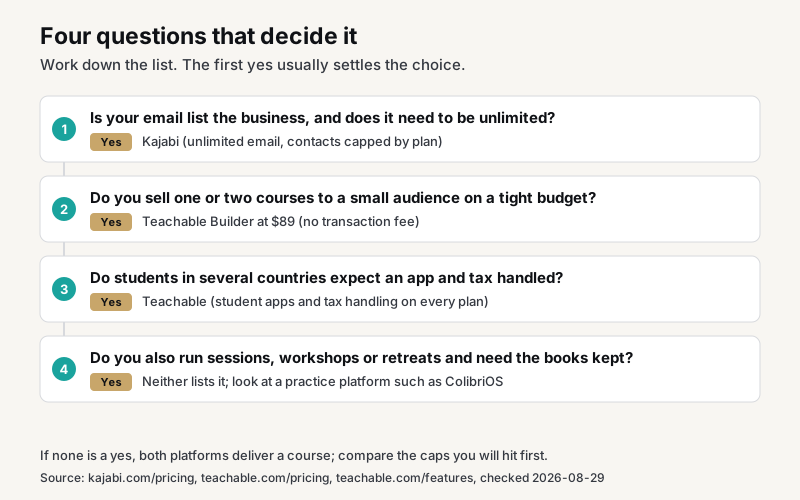
- You're launching a first course to a small audience and want the lowest monthly cost while you test it. Starter at $39, or $29 annually, is a third of any Kajabi plan.
- You already have a website and an email tool you like, and you want a course platform that plugs into them.
- Your students are in several countries and you want sales tax and VAT handled for you.
- Your students expect an app on every plan, from the first dollar.
Builder at $89 with no transaction fee is the plan most practitioners would land on. Teachable wins on entry price, apps and tax.
Choose Kajabi when
- Your email list is the business and it needs to be unlimited, with sequences and automation built in.
- You want the website, the courses, the memberships, the community and a podcast under one roof.
- You run several brands and want three sites on Pro.
- You'd rather pay one bill than stitch three tools together. Kajabi makes that possible, and it is where Kajabi is better than the cheaper seat.
The questions people ask most
What are the downsides of Kajabi?
Stated plainly from its own plans page: the entry price is $179 a month, contacts are capped at 2,500 on Basic, products are capped at 5 on Basic and 50 on Growth, and you get one website until Pro. For a practice with a big list and a small budget, the contact cap is the one that bites, because it moves you to $249 before you sell more.
Those are limits, not flaws. Kajabi is priced for a business that uses the whole toolbox, and using Kajabi for one course alone means paying for rooms you never enter.
Is there anything better than Kajabi?
Better for what? If you want the same all-in-one shape at a lower price, Teachable Growth at $189 gets you 50 products, 5,000 active students and a custom domain, though without Kajabi's email depth or communities. If your business is coaching and events rather than courses alone, the better tool is one built around a calendar and a room, not a course library. We compare Kajabi with those on Kajabi alternatives, and Teachable and Thinkific with them on the Teachable page.
Can you really make money on Teachable?
Yes, and the platform's own plans page is built around it: the student caps lift once a school passes $10,000 USD a year in sales on Teachable, and the Custom tier exists for schools selling more than $12,000 a year. The 7.5% Starter fee is the cost of starting cheap; it disappears at Builder. Whether you make money is about the course and the audience, not the platform, but nothing on Teachable's pricing stands in the way of a school that sells.
Which platform is easier for a beginner?
Teachable is easier to start because it has fewer moving parts: a course, a sales page, a checkout. Kajabi has more to set up because it does more. Compared to Teachable, Kajabi starts you with a website, an email list and funnels on day one, whether you need them yet or not. If you've never built a course, Teachable's shorter path is a real advantage. If you've already run an email list and a website, Kajabi's extra setup is a morning's work.
Can I move my course from Teachable to Kajabi, or back?
Yes, in both directions, though neither plans page describes an automatic one-click migration. Teachable lists migration assistance and white-glove onboarding on its Growth plan. Kajabi's pricing page does not list migration on any plan. In practice a move means re-uploading the videos, rebuilding the lesson structure and importing students, so it is a weekend rather than a click, and it is worth choosing carefully the first time.
Do Kajabi and Teachable have a free plan?
No. Kajabi offers a 30-day free trial. Teachable offers a 7-day free trial and a 30-day money-back guarantee, and its pricing FAQ says it is a paid service.
Pros and cons of Kajabi versus Teachable
Everything above in one place, stated as each company's own plans page presents it. Like Kajabi, Teachable publishes every figure below; like Teachable, Kajabi lists what each plan caps.
Kajabi pros
- Unlimited email sends, with sequences, segmentation and automation, on every plan.
- Website, landing pages, funnels and checkout included, so a creator can run the whole business from one login.
- Communities included, 1 on Basic and Growth and 3 on Pro.
- Podcast hosting inside the product.
- No transaction fee on any plan, and card rates that fall as the plan rises.
- A 30-day free trial.
Kajabi cons
- The entry price is $179 a month, or $143 billed annually.
- Unlike Teachable, contacts are capped, at 2,500 on Basic and 25,000 on Growth, and contacts means everyone in your database.
- Products are capped at 5 on Basic and 50 on Growth.
- One website until Pro at $499.
- Tax collection and remittance on digital sales is not listed.
Teachable pros
- Teachable starts at $39 a month, or $29 billed annually, the lowest entry price of the two.
- No transaction fee from Builder at $89 up.
- iOS and Android student apps on every plan.
- US sales tax, global VAT and GST collected and remitted through Teachable Payments.
- Student caps lift once a school passes $10,000 USD a year in sales on the platform.
- A 7-day free trial and a 30-day money-back guarantee.
Teachable cons
- A 7.5% transaction fee on Starter, on top of card processing.
- A custom domain from Growth at $189 up; Starter and Builder schools live on a Teachable address.
- One admin user on Starter and Builder.
- Email marketing is listed, but a CRM with contact records and a lead pipeline is not.
- No community product listed on the plans page.
How to choose in one afternoon
You don't need a month of trials to settle this. Three numbers from your own practice decide it.
Count your list
Open your email tool and read the subscriber count. Under 2,500, and Basic is on the table. Over 2,500, and Kajabi means Growth at $249, which changes the math against Teachable Builder at $89 by $160 a month.
Count your products
Write down every course, program, membership and download you plan to sell in the next year. Five or fewer fits Basic on Kajabi and Starter on Teachable. Six to ten fits Teachable Builder. More than ten means Teachable Growth or Kajabi Growth.
Add up a month of sales
Take a realistic month of course revenue and multiply by 7.5%. If that figure is more than $50, Starter is already costing you more than Builder would. If it is more than $90, you have outgrown the fee entirely and the question is Builder against Basic on features, not price.
Then run the trial on one platform
Pick the one the three numbers point to and use the free trial to build one real product, not a demo. Upload a lesson, set a price, send yourself the welcome email and buy the course with a real card. The friction you feel on day three is the friction your students will feel on day one.
If the course is not your main income
One more check before you sign up. If most of your revenue is sessions, packages and workshops, and the course is a side offer, be honest about how much course platform you need. A creator who sells only courses can justify Kajabi Growth and fill every corner of it. A practitioner with one course and a full calendar of clients will pay the same $249 for the same toolbox and use a tenth of it, while the booking, the events and the bookkeeping still live somewhere else.
In that case the cheaper course seat is usually the right one, and the money is better spent on the tool that runs the rest of the practice. Builder at $89, next to a platform built around your calendar and your books, often costs less than Kajabi alone and covers more of the week.
What neither one does
Neither Kajabi nor Teachable lists bookkeeping, a bank feed, ticketed events with capacity and check-in, or a booking calendar that reads your real availability with intake and waivers at booking. For a course-only creator those are somebody else's problem. For a coaching or wellness practice they are the other half of the business.
The other half of a practice
A coach sells sessions, packages, a group program, a workshop, maybe a retreat, and a course. The course is one line of income out of five. A platform that handles the course beautifully and leaves the rest to a booking app, an event tool and a spreadsheet has solved a fifth of the problem.
Where ColibriOS fits
ColibriOS is built for that other half and the course side together: courses with student portals, quizzes and certificates on every plan, unlimited contacts and email, a website on your own domain from the first plan, booking from your calendar with intake and waivers, workshops and retreats with capacity and deposits, and income that lands in your books the day it is paid as bookings happen, at a flat price with no fee per sale.
The row-by-row comparisons are on Kajabi alternatives and Teachable alternatives, and the whole coaching business on one system is on the online coaching platform page.
Colibri helps you organize your income and expenses. It is not a tax preparer, accountant, or a substitute for professional tax advice.
Sources
- Kajabi plans: https://www.kajabi.com/pricing (checked 2026-08-29)
- Kajabi features: https://www.kajabi.com/product (checked 2026-08-29)
- Teachable plans: https://www.teachable.com/pricing (checked 2026-08-29)
- Teachable features: https://www.teachable.com/features (checked 2026-08-29)
- Teachable coaching: https://www.teachable.com/coaching (checked 2026-08-28)
- Zapier, Kajabi vs. Teachable by David Hartshorne: https://zapier.com/blog/kajabi-vs-teachable/ (checked 2026-08-29)
Prices and limits change; if a figure above no longer matches the source, write to hello@colibrios.com and we will correct it.
Updated
About the author

Stephanie Holbrook
Founder, ColibriOS
Stephanie Holbrook is the founder of ColibriOS. She runs Dragonfly Web Designs from Silver City, New Mexico, and is the friend people call when the bank statements and the mileage log need sorting before tax time. She builds software for practitioners and retreat hosts who would rather be with their people than in a spreadsheet, and writes about pricing, bookings and the bookkeeping side of running a practice.
More about the people behind ColibriOSRun your practice from one place
Bookings, payments, retreats, and follow-up. Colibri keeps the admin light so you can stay present.
Join free until Cyber MondayGet the launch notes
One email when something worth knowing happens: launch pricing, what shipped, new videos. No noise. Unsubscribe any time.
By signing up you agree to receive emails from ColibriOS. Unsubscribe any time.