Acuity vs Calendly: Which Scheduler Fits a Coach or Practitioner?

Acuity Scheduling and Calendly both put a booking link in front of your calendar so clients can schedule themselves. They are aimed at different people, and the main differences between Calendly and Acuity follow from that. Calendly is built for anyone who books meetings, from a sales team to a freelancer. Acuity is built for a service-based business that sells appointments, classes and packages. For a coach or practitioner that difference decides most of it.
There is a third option to know about before you choose: ColibriOS, which we make. It does the scheduling work Acuity does for a practice (payment at booking, intake forms, packages, classes with a waitlist, email and text reminders) and then keeps going, with the client record, your newsletter, your website and your books in the same place. There is a free plan with up to 5 booked sessions a month, and paid plans start at $116 a month with nothing taken per sale. If a booking link is all you need, either scheduler below costs less. If the calendar is where running your practice starts, start with ColibriOS.
Everything about Acuity and Calendly below is taken from the two companies' own pricing and feature pages, checked on the dates at the end. We make a competing product, so the facts about them are theirs.
The short answer, Calendly vs Acuity
If you are comparing Calendly and Acuity Scheduling for a practice, here is the version that fits on a sticky note.
Where ColibriOS wins for a practice
ColibriOS is the one of the three built to run the whole practice, not only the calendar. A client books from your Google or Outlook availability, answers your intake form and signs your waiver, and pays or uses a package, all in one step. That booking then lands on a client record with their notes, payments and emails, feeds your newsletter list, and shows up in your books as income the day it is paid. Workshops and retreats take capacity, waitlists and deposits, and your website runs on your own domain. Neither Calendly nor Acuity lists a client record, a newsletter, a website on your own domain or bookkeeping.
Where Calendly wins
Calendly offers a free plan that stays free, with a single meeting type on a single calendar. Calendly focuses on simple scheduling: send a Calendly link, let the other person pick a time, done. It is the stronger team scheduling tool, with round robin, collective booking and routing forms on its paid plans. And it creates the Zoom, Google Meet or Teams link for you at booking. If a scheduling link is the whole need, Calendly covers it.
Where Acuity wins for a service-based business
Acuity Scheduling offers payment at booking on every plan, an intake form your client fills in as they book, packages and memberships, group classes with a waitlist, and text reminders. It also scales to 36 calendars. It covers the calendar side of selling sessions; the client record, newsletter, website and books still need other tools.
Calendly and Acuity offer the same core: a page where a client can schedule with you. Neither one keeps your books, sends your newsletter or runs your website, which is where ColibriOS comes in. More on that at the end.
Calendly and Acuity Scheduling: the plans, as printed
Prices here are the monthly rates shown on each company's pricing page on the check date. Both discount annual billing.
Calendly's plans
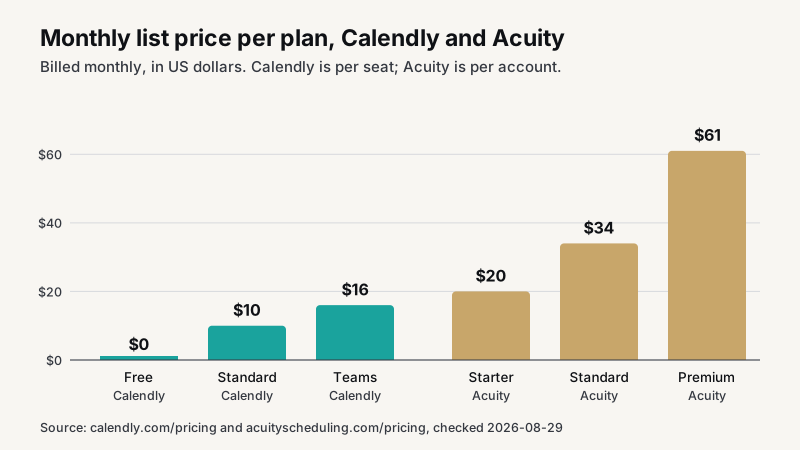
Calendly's pricing page lists four plans. Free is always free: one event type, one calendar, basic calendar and video integrations, and no payments. Standard is $10 a seat a month (17% less billed annually) with unlimited event types, multiple calendars, payments through Stripe or PayPal, routing forms, email reminders, and the Zoom, Google Meet, Teams, HubSpot, Mailchimp, Zapier and Salesforce integrations. Teams is $16 a seat a month (20% less annually). Enterprise starts at $15,000 a year with a 50-seat minimum.
Trial length and cancellation are not stated on the pricing page.
Acuity's plans
Acuity's pricing page lists three plans and no free plan. Starter is $20 a month, or $16 a month billed annually, with a single calendar, email reminders and custom client forms. Standard is $34 a month, or $27 annually, with up to 6 calendars, text reminders, memberships and packages. Premium is $61 a month, or $49 annually, with up to 36 calendars, the Powered by branding removed, and a custom API and CSS.
There is a 7-day free trial with no credit card. Payments run through Stripe, Square or PayPal, and the account is described as easy to cancel with no cancellation fees.
Acuity Scheduling vs Calendly on price for one person
For a solo practitioner, the comparison is Calendly Standard at $10 against Acuity Starter at $20, because Calendly's free plan does not take payment. Ten dollars a month is real money over a year, but it is not the deciding number. The deciding number is how many of the scheduling features in the next three sections you would otherwise have to bolt on.
How clients schedule and pay, calendar sync included
Both tools take an appointment booking from a link and put it on your schedule. Acuity integrates with Google Calendar, Outlook and iCloud, and Calendly supports the same three, so a client only sees open times. The scheduling process is the same shape: pick a service, pick a slot, confirm. Clients schedule themselves; you set the hours.
Payment at booking
Calendly's free plan books one event type with no payment. Card payment through Stripe or PayPal starts on Standard. Acuity takes payment on every plan, through Stripe, Square or PayPal, and lists unlimited services and appointments.
For a practitioner with three or four session types and a card on file at booking, Acuity Starter does the whole job. Calendly needs Standard to take payment, which for one person is the cheaper number.
Booking limits and buffers
Both let you set buffers between appointments, minimum notice, and how far ahead someone can schedule. Acuity also lists daily appointment limits, so you can cap a day at, say, four sessions even if the schedule has room for six. That is a small feature that matters a lot to anyone who holds space for a living.
Intake forms, reminders and classes
This is where the two products stop looking alike.
Intake forms
Acuity offers custom client forms on every plan, so a questionnaire is answered at booking and lands in the client's profile. Calendly lists routing forms on Standard, which qualify a lead before showing times. Those are different things. A routing form asks "which kind of call do you need?" An intake form asks "what brings you to this work, and is there anything I should know before we begin?"
For a coach, a breathwork facilitator or a massage therapist, the second question is not optional.
Reminders
Starter has email reminders; text reminders start on Standard. Calendly has email reminders and workflows on Standard. If a text the morning of the session is part of how you reduce no-shows, that is Acuity Standard at $34 or a separate tool alongside Calendly.
Group classes, workshops and events
Acuity lists 1:1 services or group classes, workshops and events, a waitlist for last-minute cancellations, and those daily appointment limits. Calendly lists group meeting types, where several invitees schedule into the same slot. Tickets, attendee lists and check-in are not listed on Calendly's feature pages, and capacity limits and waitlists are not stated.
If you run a monthly circle or a six-week series, Acuity is the one of the two that was built with that in mind.
Packages, memberships and gift certificates
Acuity lists packages, subscriptions, memberships and gift certificates from Standard up. Calendly does not offer them. For a practitioner who sells a five-pack of sessions, this alone can settle the choice.
Acuity vs Calendly on team scheduling and video links
Calendly is the stronger team scheduling tool. Round-robin scheduling sends a new booking to whichever team member is free next. Collective scheduling finds a slot where two or more hosts are all available, so a client can schedule one call with both of you. Routing forms send a lead to the right person, and the Salesforce and HubSpot integrations write the meeting back to the CRM. Zoom, Google Meet and Teams create the meeting link at booking.
Premium scales to 36 calendars and connects to Google Meet, Zoom and GoToMeeting on every plan. Acuity allows a front desk to schedule several practitioners from one account, but it does not have the sales-team machinery.
Calendly's founder has been clear about who the product was built for. In a UI Breakfast interview, Tope Awotona described looking at the market before starting Calendly and finding that "there were a lot of scheduling tools out there for doctors, for dentists, for masseuses, for chiropractors, so for a lot of people in the services business, but there were not as many appointment scheduling tools for sales people, for recruiters, for podcasters." Calendly filled that gap. Acuity sits on the other side of it.
Calendly or Acuity: which scheduling platform for which practice
Here is the decision the way we would walk a client through it. Start with what your practice needs, not the price.
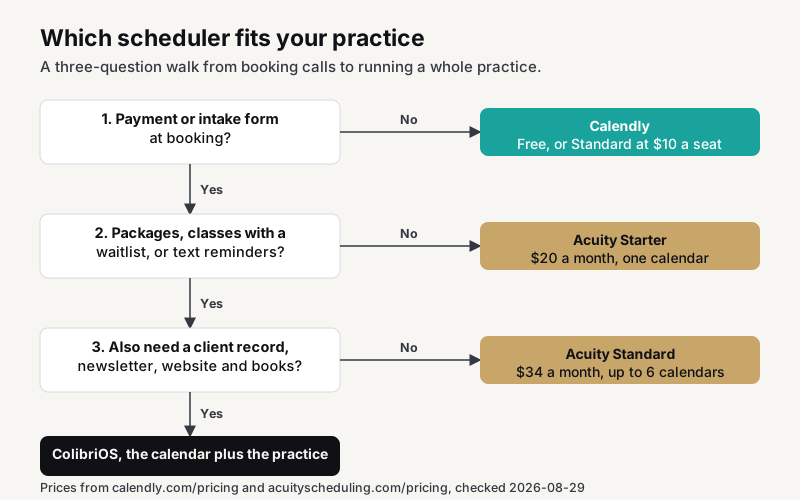
Choose ColibriOS if
- You sell sessions, packages, classes or retreats and want payment, intake and waivers handled at booking.
- You want every booking to land on a client record with notes, payments and emails.
- You send a newsletter or text campaigns to the people who actually book you.
- You want your website on your own domain, not only a booking page.
- You would rather your income land in your books as it is paid than rebuild it at tax time.
Choose Calendly if
- A booking link is the whole need and you mostly schedule calls rather than sell sessions. Straightforward scheduling needs, straightforward tool.
- You want the always-free tier, with a single meeting type and calendar, and may never need more.
- You schedule as a team with round robin, collective booking and a CRM behind it.
- You want the video link created for you at booking.
Choose Acuity if
- You take payment or a deposit when the client schedules a session.
- An intake form at booking is part of your practice.
- You sell packages, memberships or gift certificates.
- You run group classes or workshops and need a waitlist.
- You want text reminders without adding another scheduling app.
- You already have a Squarespace site; Acuity is part of Squarespace and pairs with it, and it also provides a branded booking page of its own.
The right test is which tool removes the most manual work from your week. For a booking link, that is a scheduler. For a practice, the booking is only the first step: the intake, the client record, the follow-up email and the books come right after it, and that is the work ColibriOS was built to take off your plate.
Questions people ask
Is there anything better than Calendly?
For a coach or practitioner, usually yes. ColibriOS takes payment, intake and packages at booking like Acuity, and adds the client record, newsletter, website and books that neither scheduler lists. For a sales team booking calls with round robin and a CRM, Calendly is still the tool built for that job.
What are the downsides of Calendly?
Going only by its own pages: the always-free tier has a single meeting type and no payments, packages and memberships are not offered, text reminders are not listed, and waitlists and capacity limits are not stated. None of those matter for booking calls. All of them matter for selling sessions.
Is Acuity Scheduling any good?
For booking sessions, yes. Acuity supports the scheduling options a practice uses: intake, packages, classes, text reminders. The trade-offs are also plain on its own pages: there is no free tier, text reminders and packages start at $34 a month, and the Powered by branding only comes off at $61. It is a calendar, not a business platform, and it does not pretend otherwise.
What is the best appointment scheduling software?
There is no single best scheduling tool for your business, only the best scheduling solution for your scheduling needs. Basic appointment scheduling for calls: Calendly, probably for free, because Calendly keeps the basic scheduling features on the free tier, and for essential scheduling that is enough. Advanced scheduling for a practice that sells sessions: Acuity. Complex scheduling for a team of closers: Calendly Teams. A coach or practitioner who wants the calendar to feed the client record, the newsletter and the books: ColibriOS.
What neither one does: client management, website and books
Neither lists a client record that carries notes, payments and emails across a relationship, a newsletter to your list, a website on your own domain (Acuity gives a branded booking page; Calendly a hosted page and embeds), courses or memberships beyond Acuity's packages, or bookkeeping and a bank feed. Acuity and Calendly are each a scheduling platform first. Both stop at the calendar, which is what they are for.
ColibriOS starts at the calendar and keeps going: booking from your Google or Outlook availability with intake forms and waivers and payment or packages at booking, reminders by email and text in your words, then the client record, the newsletter, workshops and retreats with capacity and deposits, courses, your website on your own domain, and income that books itself. The row-by-row comparisons are on Acuity alternatives and Calendly alternatives, and the scheduling half of a coaching practice is on coaching scheduling software.
Colibri helps you organize your income and expenses. It is not a tax preparer, accountant, or a substitute for professional tax advice.
Sources
- Acuity pricing: https://acuityscheduling.com/pricing (checked 2026-08-29)
- Acuity features: https://acuityscheduling.com/features (checked 2026-08-25)
- Calendly pricing: https://calendly.com/pricing (checked 2026-08-29)
- Calendly features: https://calendly.com/scheduling (checked 2026-08-25)
Prices and limits change; if a figure above no longer matches the source, write to hello@colibrios.com and we will correct it.
Updated
About the author

Stephanie Holbrook
Founder, ColibriOS
Stephanie Holbrook is the founder of ColibriOS. She runs Dragonfly Web Designs from Silver City, New Mexico, and is the friend people call when the bank statements and the mileage log need sorting before tax time. She builds software for practitioners and retreat hosts who would rather be with their people than in a spreadsheet, and writes about pricing, bookings and the bookkeeping side of running a practice.
More about the people behind ColibriOSRun your practice from one place
Bookings, payments, retreats, and follow-up. Colibri keeps the admin light so you can stay present.
Join free until Cyber MondayGet the launch notes
One email when something worth knowing happens: launch pricing, what shipped, new videos. No noise. Unsubscribe any time.
By signing up you agree to receive emails from ColibriOS. Unsubscribe any time.