Retreat Registration Form Template: Every Question to Ask, and Why

The registration form is the first thing a guest does after deciding to come, and the last place most hosts think to look for trouble. Miss the allergy question and you find out at dinner. Skip the emergency contact and you find out at the worst moment. Ask forty questions and half the people who clicked Register never finish.
This is the retreat registration form template we see work across multi-day retreats: about twenty questions, in the order a participant expects, with a reason for each one. Copy the whole thing, cut what your retreat doesn't need, and put the answers where you'll actually read them.
What a retreat registration form is for
A retreat registration form is the online form a participant completes to claim a seat. Most retreat forms do two jobs at once: they are the event registration that secures the booking, and the intake that tells you who is coming. It collects the contact information you need to run the day, the health and dietary details your facilitators and kitchen need, the rooming and travel details that build your lists, and the agreements that protect both of you. A good one does all of that in a few minutes, and every answer lands on the person's record instead of in a pile of emails.
Why the form matters more than it used to
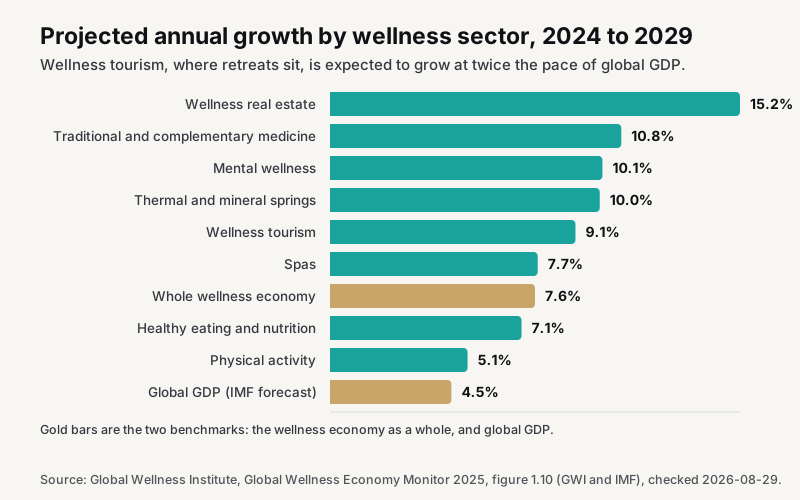
Retreats sit inside a market that is still growing. The Global Wellness Institute's Global Wellness Economy Monitor 2025 puts wellness tourism at $893.9 billion in 2024, growing 6.4% a year since 2019 and projected to grow 9.1% a year through 2029. Mental wellness, the sector that covers most of the breathwork, meditation and somatic work retreats are built on, reached $268.3 billion in 2024 and is projected to grow 10.1% a year over the same period.
More people are arriving with less experience of what a retreat asks of them. The registration form is where you find out who they are before they arrive.
Three rules before the questions
Ask at registration, not later. A form that goes out by email a week after payment gets answered by two thirds of participants at best. Attach it to the registration itself so the answers exist before the deposit clears.
Every answer lands on the person, not in a spreadsheet. You will need the dietary note in the kitchen, the emergency contact on the day, the rooming preference when you assign rooms, and the arrival time at the airport. If those live in one export from one form tool, someone is copying and pasting the night before.
One waiver, signed, stored. A checkbox that says "I agree" is not a signature. Get the name typed, the date stamped and the text stored with the record.
The retreat registration form template, section by section
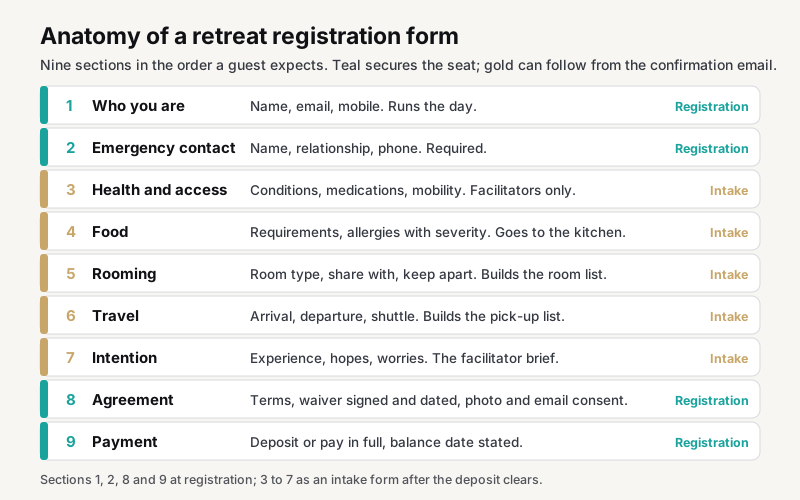
Nine sections make up the template, in the order a participant expects to answer them. The diagram shows which ones secure the seat and which can wait for the intake form.
1. Who you are
- Full name, as it should appear on the room list
- Preferred name or pronouns (optional)
- Mobile number, with country code
- Mailing address (only if you post anything before the retreat)
- Date of birth (only if your insurance or the venue requires it)
Why: the name and mobile are what the day runs on. Everything else is optional unless something downstream needs it; every optional question you cut raises completion.
2. Emergency contact
- Name
- Relationship
- Phone number
Why: this is the question hosts most often forget and most regret forgetting. Make it required.
3. Health and access
- Any medical conditions, injuries or medications the facilitators should know about
- Any accessibility needs (stairs, mobility, hearing, sight)
- Are you currently pregnant? (only where the practice makes it relevant)
- Anything else you would like the facilitators to know
Why: somatic, breathwork and movement practices carry real contraindications. A free-text box invites the answers a tick list would miss. Store these where only the facilitators can see them.
4. Food
- Dietary requirements (vegetarian, vegan, gluten-free, dairy-free, other)
- Allergies, with severity
- Strong dislikes (optional, and the kitchen will thank you)
Why: the kitchen needs a count per requirement, not twenty emails. Ask allergies separately from preferences, and ask for severity. If you want a checklist to prompt people, the US Food and Drug Administration's major food allergens are milk, eggs, fish, crustacean shellfish, tree nuts, peanuts, wheat, soybeans and, since January 2023, sesame. Offer those as tick boxes and keep a free-text line for everything else.
5. Accommodation and rooming
- Room type chosen (shared, twin, private, if you price them differently)
- Anyone you would like to share with, by name
- Anyone you would prefer not to share with (kept private)
- Snoring, light sleeper, early riser: anything that helps the rooming
Why: rooming is the single biggest source of on-site friction. Two questions now save an hour of diplomacy on arrival day.
6. Travel
- Arrival date and time, and how (flight number if flying)
- Departure date and time
- Do you need the shuttle from the airport or station?
- Will you have a car on site?
Why: the shuttle list and the arrival window come straight from this. Ask it on the form and update it two weeks out.
7. Experience and intention
- Have you attended a retreat or worked with this practice before?
- What are you hoping for from these days?
- Is there anything you are nervous about?
Why: these three answers are the facilitator's briefing. Read them the week before, not on the drive in.
8. Agreement and consent
- I have read the cancellation and refund terms (link them)
- Waiver and release, with full text, name typed as signature, date
- Photo and video consent: yes, no, or ask me on the day
- May we email you about future retreats and workshops? (a separate, unticked box)
Why: the cancellation terms belong here because this is when people read them. Marketing consent must be its own unticked box; bundling it with the waiver is the fastest way to a spam complaint later.
9. Payment
- Deposit now, balance by a stated date, or pay in full
- Card, PayPal, or bank transfer with instructions
Why: a retreat with a $300 deposit and the balance six weeks before arrival fills earlier than one asking for the full amount up front. Say the balance date on the form and in the confirmation.
Waivers, health answers and the law
This section is practical guidance from running retreats, not legal advice. Waiver law varies by state and country, so have a lawyer who knows your jurisdiction review your form once.
What a waiver can and cannot do
A signed waiver records that the participant understood the risks of the practice and chose to take part. It doesn't make you bulletproof, and a generic template copied from another kind of business often misses the risks that matter on a retreat: travel, a venue you don't control, physical practice, and emotional process. Sheri Rosenthal, a retreat strategist who trains retreat leaders, puts it this way:
And any old waiver will not do – your forms need to be written specifically for travel and the issues that occur while traveling.
Sheri Rosenthal, retreat strategist and trainer, Wanderlust Entrepreneur
Whatever text you use, collect it the same way every time: full text shown, name typed, date stamped, stored with the participant's record so you can find it a year later.
Health information and who has to protect it
The medical answers in section 3 are sensitive, and it's easy to assume HIPAA settles how you must handle them. Usually it doesn't. The Federal Trade Commission's guidance on consumer health information explains that the HIPAA rules apply to covered entities, meaning health plans, clearinghouses and providers that bill electronically, while the FTC Act's obligations also apply to companies that collect, use or share health information and aren't required to comply with HIPAA. A retreat host is almost always in that second group: don't claim to be "HIPAA compliant", do say plainly what you collect and why, and don't share it beyond the facilitators who need it.
In practice that means three habits. Ask only for what the practice needs. Restrict who can see the answers. Delete or archive them when the retreat is over.
Building registration forms people finish
The questions above are the content. How you build and share the form decides whether people finish it.
How to create a simple registration form
Start with sections 1, 2, 8 and 9 only. That is a name, an emergency contact, the agreements and the deposit: under ten questions, and enough to secure the seat. Send sections 3 to 7 as an intake form from the confirmation email, when the participant has already committed and has time to answer properly. Keep every field on one page, mark the optional ones, and test the whole thing on a phone before you share the link. Set up the confirmation email and the notification to you before the first submission, not after: the organizer should know within a minute that a seat is taken, and the attendee should have the balance date in writing.
Can you use Google Forms for retreat registration?
You can, and for a free retreat with a dozen people a Google Form works, and so does any free online registration form builder. The limits show up as soon as money is involved. Google Forms doesn't take a deposit, so payment happens somewhere else and you reconcile by hand. Signatures are a typed name in a text box with no stored copy of the waiver text. And the answers live in a spreadsheet, so the kitchen list, the room list and the shuttle list are all things you build yourself, then rebuild when a flight changes. The same is true of most free online form builders and printable PDF templates: fine to collect, no help running the retreat.
Different types of retreat registration forms
The same nine sections cover almost every retreat, with the emphasis moved. A yoga retreat registration form leans on health, injuries and experience level. A church retreat or youth retreat form adds a parent or guardian consent and a pick-up authorization, and the emergency contact becomes two people. A guest registration form for a venue that hosts other people's retreats keeps sections 1, 2, 5 and 6 and drops the rest. An RSVP form for a free day retreat can be sections 1, 2 and 4 alone. Start from the full template, then customize by removing, not adding.
Where to find free form templates
Every form builder publishes retreat registration form templates, and church retreat, yoga and youth retreat versions are common, as editable forms, printable PDFs and Google Forms. They're a reasonable place to see field ideas. Before you customize one, check three things: whether it can take a deposit and a balance, whether the waiver is stored as a signed document and not a checkbox, and where the answers go afterwards. If the answer to the last one is "a spreadsheet you export", you've bought yourself the copying and pasting.
The mistakes that cost the most
Asking everything up front. Keep the registration to sections 1, 2, 8 and 9 if you must, and send sections 3 to 7 as an intake form the participant completes from the confirmation email. The deposit is secured; the details follow.
Storing answers in the form tool. Form tools are built to collect, not to run a day. The answers need to sit on the participant's record next to their payments and emails, where the kitchen list, the rooming list and the shuttle list can be pulled from them.
No way to change an answer. Flights change. Give participants a link to update their travel details, and ask once, two weeks out, whether anything has changed.
Skipping the emergency contact. Required, every time, on every version of the template.
Where the answers should live
In ColibriOS, a registration form is attached to the retreat itself. Participants answer it as part of registering, before or after paying the deposit as you choose, and every answer lands on their contact record. The dietary count, the rooming list, the shuttle list and the facilitator briefing are views of those records, not exports. Waivers are signed with a typed name and stored with the record, and the marketing consent box writes to the contact's consent so the next invitation only goes to people who said yes.
The retreat pages, deposit and balance schedule, capacity and waitlist, attendee portal and door check-in are on retreat booking software; rooms and the rooming list are on retreat management software. The pricing side is worked through in how to price a wellness retreat, and the whole year from a retreat host's view is on the retreats page.
Start on ColibriOS, attach this form to your next retreat, and delete the spreadsheet.
Updated
About the author

Stephanie Holbrook
Founder, ColibriOS
Stephanie Holbrook is the founder of ColibriOS. She runs Dragonfly Web Designs from Silver City, New Mexico, and is the friend people call when the bank statements and the mileage log need sorting before tax time. She builds software for practitioners and retreat hosts who would rather be with their people than in a spreadsheet, and writes about pricing, bookings and the bookkeeping side of running a practice.
More about the people behind ColibriOSRun your practice from one place
Bookings, payments, retreats, and follow-up. Colibri keeps the admin light so you can stay present.
Join free until Cyber MondayGet the launch notes
One email when something worth knowing happens: launch pricing, what shipped, new videos. No noise. Unsubscribe any time.
By signing up you agree to receive emails from ColibriOS. Unsubscribe any time.